

How to Make a One-Time Payment

Last updated: Sep 15, 2026
Need to make a one-time payment?
All CVR MLS invoices include a direct payment link. Clicking on that link will take you to a payment screen that does not require you to log in.
You can also make payments in the Member Hub.
First, log into the Member Hub by clicking on the tile on the MLS Dashboard.
Then,
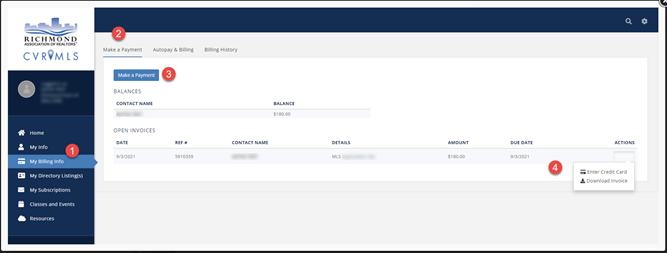
- Select My Billing Info.
- Select the Make a Payment tab to see your outstanding balances and open invoices.
- Select Make a Payment and follow the prompts to enter your credit card information (you can store this card information for future use, if desired).
- You can also select Actions to download a copy of the invoice.
Would you also like to set up autopay for future CVR MLS payments? Click here to learn how.

